Summary
In Gymnasium v1.0, significant changes were made to improve the VectorEnv implementation. One of these changes is how sub-environments are reset on termination (or truncation), referred to as the Autoreset Mode or API. Since Gymnasium v1.1, Gymnasium’s built-in vector environments and wrappers support all autoreset modes / APIs, though the default with make_vec is next-step. In this blog post, we explain the differences in the possible modes and how to use them with example training code for each.
Autoreset Modes
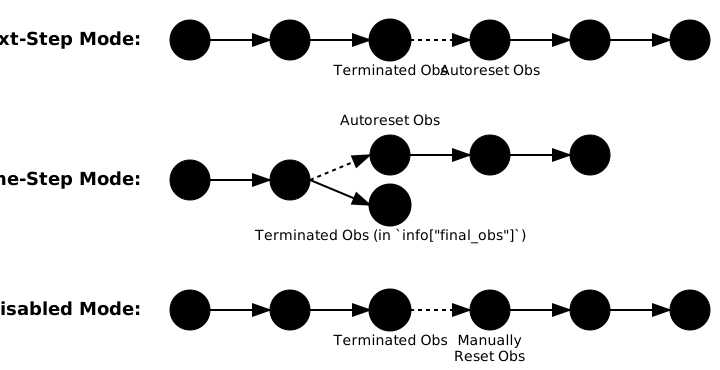
Vector environments allow multiple sub-environments to run in parallel, improving training efficiency in Reinforcement Learning through sampling multiple episodes at the same time. When one or more sub-environments terminate or truncate, they must be reset before further actions can be taken, so what should the vector environment do? There are three options referred to as Next-Step, Same-Step and Disabled mode, visualised in the figure below.
Gymnasium’s built-in vector environment implementations, SyncVectorEnv and AsyncVectorEnv, support all three modes using the autoreset_mode argument expecting a gym.vector.AutoresetMode, for example, SyncVectorEnv(..., autoreset_mode=gym.vector.AutoresetMode.NEXT_STEP). Further, most of Gymnasium’s vector wrappers support all modes; however, for external projects, there is no guarantee what autoreset mode will be supported by either the vector environments, wrapper implementations or training algorithms. To help users know which autoreset mode is being used, vector environments should specify VectorEnv.metadata["autoreset_mode"], and developers should document which autoreset modes their projects support.
For Gymnasium, some of the vector wrappers only support particular autoreset modes.
| Vector Wrapper name |
Next step |
Same Step |
Disabled |
VectorObservationWrapper |
✔ |
✖ |
✔ |
TransformObservation |
✔ |
✖ |
✔ |
NormalizeObservation |
✔ |
✖ |
✖ |
VectorizeTransformObservation* |
✔ |
✔ |
✔ |
RecordEpisodeStatistics |
✔ |
✔ |
✔ |
* all inherited wrappers from VectorizeTransformObservation are compatible (FilterObservation, FlattenObservation, GrayscaleObservation, ResizeObservation, ReshapeObservation, DtypeObservation).
The observation wrappers that don’t support Same-Step mode fail because, in that mode, the final observation of an episode is only available in info["final_obs"] rather than as the step’s observation, so the wrapper would not transform it (or, for NormalizeObservation, include it in its running statistics).
Note: this table reflects Gymnasium v1.1. In the next release, these wrappers support Same-Step mode; however, for num_envs > 1, their behaviour is no longer equivalent to applying the single-environment wrapper to each sub-environment.
Next-Step Mode
If a sub-environment terminates or truncates, it is reset in the next step call. Gymnasium’s Async and Sync vector environments default to this mode. When implementing training algorithms using Next-Step mode, beware of episode boundaries in training, either by not adding the relevant data to the replay buffer or by masking out the relevant errors in rollout buffers.
Click for Example training code
import gymnasium as gym
import numpy as np
from collections import deque

# Initialize environment, buffer and episode_start
envs = gym.vector.SyncVectorEnv(
    [lambda: gym.make("CartPole-v1") for _ in range(2)],
    autoreset_mode=gym.vector.AutoresetMode.NEXT_STEP
)
replay_buffer = deque(maxlen=100)
episode_start = np.zeros(envs.num_envs, dtype=bool)

observations, _ = envs.reset()
while True:   # Training loop
    actions = policy(observations)
    next_observations, rewards, terminations, truncations, infos = envs.step(actions)

    # Add to replay buffer
    for i in range(envs.num_envs):
        if not episode_start[i]:
            replay_buffer.append((observations[i], actions[i], rewards[i], terminations[i], next_observations[i]))

    # update observation and if episode starts
    observations = next_observations
    episode_start = np.logical_or(terminations, truncations)
envs.close()
Same-Step Mode
If a sub-environment terminates or truncates, it is reset in the same step call. Beware that some vector wrappers do not support this mode, and that the step’s observation will be the reset’s observation, with the final observation of the episode stored in info["final_obs"]. This makes training code simple, as every step produces a valid transition. Furthermore, if you choose not to bootstrap on truncation (accepting the value error described in our step API post), info["final_obs"] isn’t needed at all. This was the behaviour of vector environments in Gymnasium v0.x, where the final observation was stored in info["final_observation"].
Click for Example training code
import gymnasium as gym
from collections import deque

# Initialize environment and buffer
envs = gym.vector.SyncVectorEnv(
    [lambda: gym.make("CartPole-v1") for _ in range(2)],
    autoreset_mode=gym.vector.AutoresetMode.SAME_STEP
)
replay_buffer = deque(maxlen=100)

observations, _ = envs.reset()
while True:   # Training loop
    actions = policy(observations)
    next_observations, rewards, terminated, truncated, infos = envs.step(actions)

    # Add to replay buffer
    for i in range(envs.num_envs):
        # Get actual next observation
        if terminated[i] or truncated[i]:
            actual_next_obs = infos["final_obs"][i]
        else:
            actual_next_obs = next_observations[i]

        replay_buffer.append((observations[i], actions[i], rewards[i], terminated[i], actual_next_obs))

    observations = next_observations  # Update observation
envs.close()
Disabled Mode
No automatic resetting occurs and users need to manually reset the sub-environment through a mask, env.reset(options={"reset_mask": np.array([True, False, ...], dtype=bool)}). The easiest way of generating this mask is np.logical_or(terminations, truncations). This makes training code closer to single-environment training code; however, it can be slower in some cases due to running additional functions.
Click for Example training code
import gymnasium as gym
import numpy as np
from collections import deque

# Initialize environment, buffer and episode_start
envs = gym.vector.SyncVectorEnv(
    [lambda: gym.make("CartPole-v1") for _ in range(2)],
    autoreset_mode=gym.vector.AutoresetMode.DISABLED
)
replay_buffer = deque(maxlen=100)

observations, _ = envs.reset()
while True:   # Training loop
    actions = policy(observations)
    next_observations, rewards, terminations, truncations, infos = envs.step(actions)

    # Add to replay buffer
    for i in range(envs.num_envs):
        replay_buffer.append((observations[i], actions[i], rewards[i], terminations[i], next_observations[i]))

    # update observation
    autoreset = np.logical_or(terminations, truncations)
    if np.any(autoreset):
        observations, _ = envs.reset(options={"reset_mask": autoreset})
    else:
        observations = next_observations
envs.close()
Which mode should I use?
- Next-Step is the default and is supported by all of Gymnasium’s vector wrappers, so it is the best choice for most new training code.
- Same-Step is useful when porting training code written for Gymnasium v0.x vector environments, or when you want every step to produce a valid transition.
- Disabled gives full control over when (and how) sub-environments are reset, with training code closest to single-environment code, at the cost of an extra
reset call.
Conclusion
The autoreset mode has a significant impact on the implementation of RL training algorithms for sampling from environments. As the modes differ in when sub-environments are reset, and therefore in the number of step calls per episode, it’s not possible to convert between different modes, and training code must be written for a specific mode. Gymnasium v1.1 now supports all three autoreset implementations with most of the wrappers supporting all of them, providing more options to developers and greater backward compatibility to Gymnasium v0 vectorised training algorithms.
If there are missing details or questions please raise them on the Farama Discord or GitHub.